Choose where the scene comes from
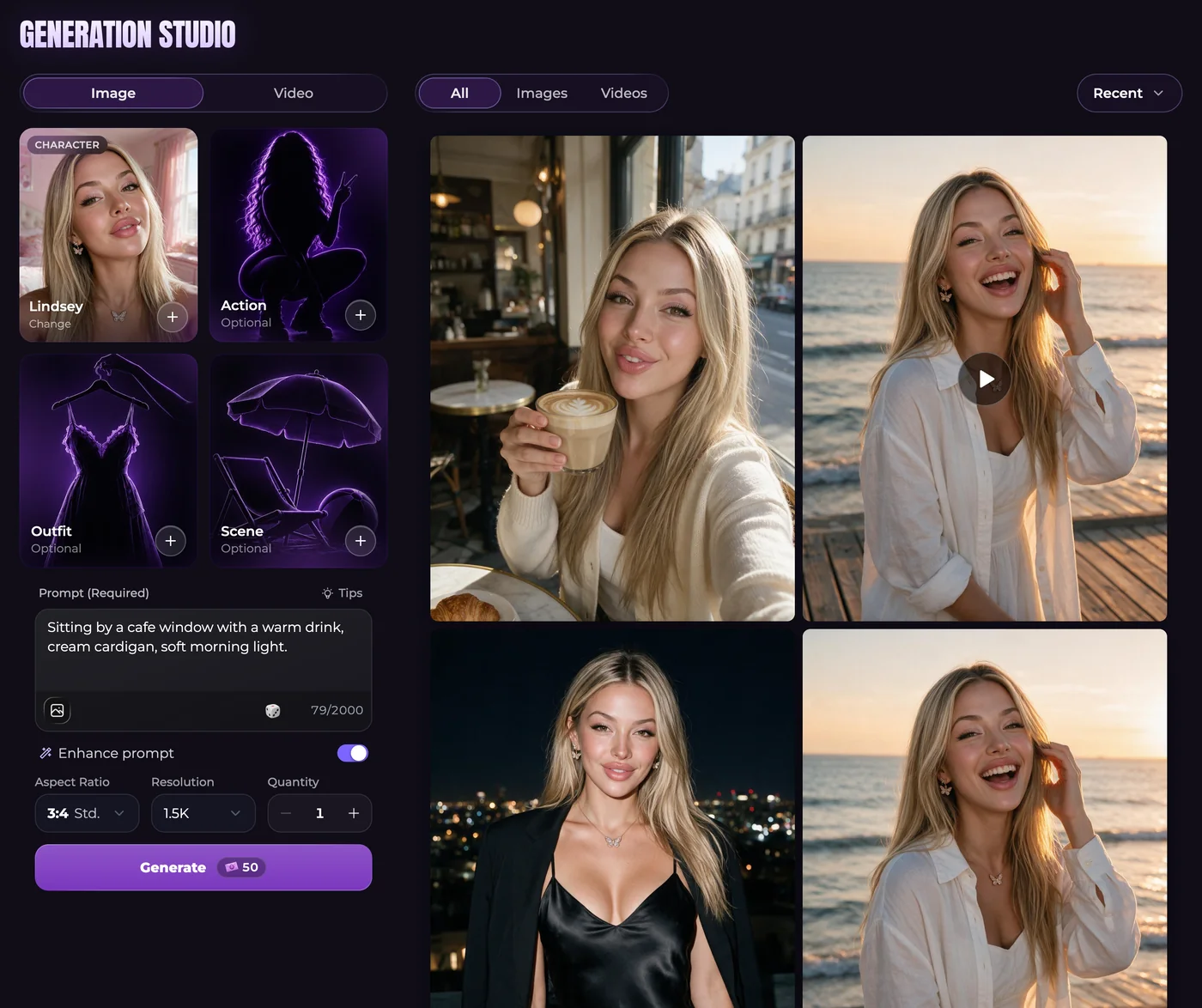
For a conversation-led picture, ask your companion for a photo or use the instant-image control. For more direct scene planning, open Generate, select Image and choose a companion. Optional Action, Outfit and Scene presets can contribute details, but their availability depends on the character.
An original scene might show a fictional adult repairing an old radio at a desk, with a yellow lamp and tools arranged beside them. Mention the work, clothing and camera position you want. Do not combine a preset for one location with instructions for a contradictory location.
Spend Moments on the settings you actually need
A standard single-companion chat photo costs 50 Moments, or 60 when it includes an Ultimate persona photo. Group requests and higher resolutions use separate totals. Advanced offers 1K, 1.5K and 2K sizes. Aspect ratio chooses the shape; quantity asks for more images. Recheck the price after changing any of these.
Advanced accepts up to five reference photos from your Secrets gallery. The first is included in the base price, and each additional reference adds 10 Moments. Choose references for a specific purpose, such as the character's appearance or the setting, from the gallery rather than an outside photo upload.
Keep the useful parts of a result
Inspect the image at a size where you can judge the face, hands and surrounding objects. If you want one change, consider the supported edit action rather than requesting an unrelated picture. Gallery actions also let you download a result or carry it into a video.
References help guide appearance but do not guarantee a perfect match. In Advanced chat photos, Lock appearance controls whether changes established in the story can influence later looks. Check that setting when a fictional change of hair or clothing is not reflected as you expected.
Common questions
Can a picture reflect what we were just discussing?
Yes. Chat photo requests use the conversation for their scene. Supported reference and appearance settings also help determine how the companion looks.
Can I put several companions in the same image?
You can select up to three companions. If an Ultimate persona joins the picture, the total limit is still three people, including that persona.
What image mode should I select for a V2 companion?
V2 companions use Advanced without a separate mode choice. The missing selector does not mean that another activation step is required.
Are photo requests unlimited on a paid chat plan?
No. Unlimited text messaging does not cover unlimited pictures. Confirm the request's Moments charge and account eligibility before submitting it.