Choose the model for the clip you have in mind
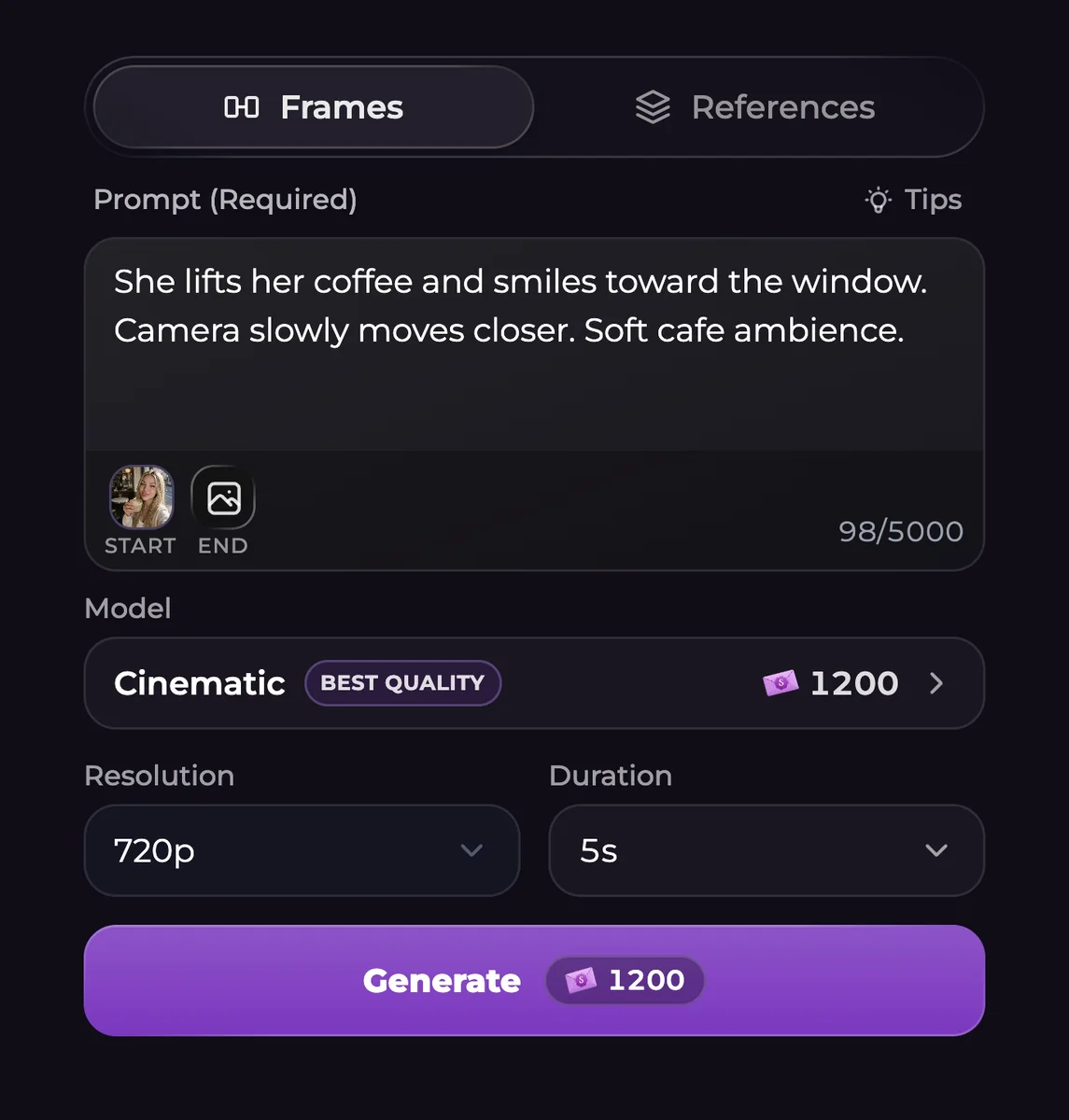
Cinematic has a Fast option and Intimate has Turbo. Everyday and Basic are separate choices; Classic is inside More models. Use the supported range for the selected model rather than treating a five-second pricing example as the only available duration.
| Model choice | Resolution range | Supported length | Sound availability |
|---|---|---|---|
| Cinematic | 480p, 720p, 1080p or 4K | 4-15 seconds | Audio included |
| Cinematic Fast | 480p or 720p | 4-15 seconds | Audio included |
| Everyday | 480p or 720p | 4-15 seconds | Audio included |
| Intimate / Turbo | 480p, 720p, 1080p or 4K | 4-30 seconds | Audio included |
| Basic | 480p or 720p | 4-15 seconds | Audio included |
| Classic | 480p, 720p or 1080p | 4-12 seconds | Audio optional |
Build the action around an existing still
Open a supported gallery image and select Create Video, or choose Video within Generate. In Frames, the source picture supplies the Start frame. Describe movement rather than repeating every visible detail of the still.
For example, a fictional adult could test the strings of a violin while the camera remains in a steady medium shot. Add a small action and the sound you want before introducing more complicated movement. Where an end frame is supported, choose an image that gives the action a clear destination.
Check sound, references and price together
Classic offers optional audio; disabling it lowers the price. Other listed models include sound. Reference options also differ, and Classic does not provide the same Frames and References controls. When you switch models or speed options, review any settings that have adjusted.
The final Generate total applies to your selected resolution, length and model, not to every future request. After completion, play the clip with sound and inspect its ending before downloading it. AI motion can distort a detail or miss an instruction, so completion alone does not establish that the result is right.
Common questions
Can I return to an older picture and animate it?
Yes, if the gallery source is supported. Create Video transfers that image into the video setup for a new request.
Is an ending image available on every model?
No. Choose a model with end-frame support when the finish matters. Classic does not have the same frame and reference controls.
Which generated videos can have audio?
Audio is included on the listed models other than Classic. Classic lets you choose whether to include it, with a lower charge when sound is off.
Does Free chat include image-to-video generation?
No. Video creation needs Premium or Ultimate and Moments. Free messages and free Shorts openings do not satisfy those requirements.
Where is the NSFW video setting?
The current Studio uses one model menu, not a separate NSFW video switch. Choose the model, then check its resolution, duration and price. The same adult-content rules apply to every selection.